Problem
A laptop in daily use collects background items: launch agents, login items, helper daemons, system extensions, browser extensions and privacy permissions. Most Mac hardening advice is a checklist. It does not say how to find what is already there, how to judge it, or how to prove that a fix worked.
Approach
Run the audit as a small assessment in two rounds.
- Plan first: scope, the checks, and a rule that round one is read-only.
- Round one scans and reports. Every finding carries the command output behind it, the risk, and a proposed fix that is not executed.
- A separate decision step picks what to fix.
- Round two applies the chosen fixes, scans deeper, and repeats the original check on each fix to confirm it.
How it works
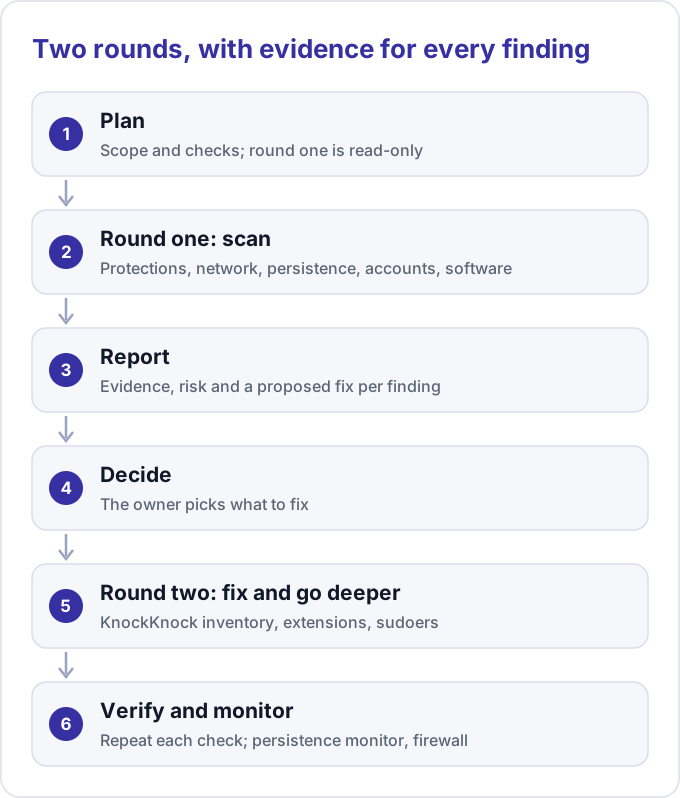
Round one covers six areas:
- Baseline protections: System Integrity Protection, FileVault, Gatekeeper, the application firewall and update settings.
- Network exposure: every listening socket mapped to its process, separating loopback-only from all-interface listeners.
- Persistence: launch agents and daemons with code-signature checks, login items from the background-task database, cron, shell startup files, system extensions and configuration profiles.
- Accounts and access: local accounts, admin membership, SSH directory permissions, authorized keys and sudoers entries.
- Installed software: signature spot checks on apps from outside the App Store, and outdated packages.
- Browser extensions in each installed browser, cross-checked with the extension scan in KnockKnock.
Round two goes deeper:
- A full persistence inventory with KnockKnock, every item judged and doubtful signatures verified.
- Third-party kernel extensions, sudoers rules and the quarantine history of recent downloads.
- Monitoring so the next change is noticed: a persistence monitor such as BlockBlock and an outbound firewall.
Privacy grants (Full Disk Access, screen recording and input monitoring under System Settings, Privacy & Security) need special handling. Reading the user-level privacy database requires Full Disk Access for the reading process, so a helper script runs from a terminal that holds it, or the panes are reviewed by hand. The system-level database is SIP-protected and unreadable even by root.
Results
- No sign of compromise in either round.
- Round one produced no critical item, only a handful of loose ends and a few hardening suggestions. Round two judged all 32 persistence items the scanner reported and added three low-risk cleanup items.
- The findings were the usual classes of loose ends, not intrusions: loose permissions on credential files, apps without a trusted signature, orphaned privileged daemons, leftovers of uninstalled software, and services listening on every interface.
- Each applied fix was verified by repeating the command that found it, with before and after evidence. Where the tool lacked access, the user performed the step and the report says so.
Lessons
- Separate finding from change. A read-only first pass is safe to run and easy to explain.
- Show your blind spots. Anything that needs elevated access, such as kernel extensions, sudoers or the privacy database, goes on a “not checked” list, not an assumed-clean one.
- Judge items by signature and need, not only by whether they are malware. Legitimate software can sit in high-privilege places such as authorization plugins and privileged helpers, and uninstalled software can leave extensions or daemons that point at nothing.
- Repeat it. A baseline report turns the next audit into a diff, and monitoring shows changes between audits.