Problem
Firewall policy changes reach reviewers as tickets in a policy management platform. Reviewing one means signing in, opening the review queue, following a ticket’s link to the policy revision, opening the list of changes, finding the rule the ticket is about, and capturing it as evidence. Each step is easy. Across a queue the work is slow and the evidence inconsistent: different crops, different file names, no record of what was looked at.
Approach
Treat the review as a pipeline that leaves a trace at every stage, not as a series of clicks.
- Drive the web interface with browser automation (Python and Selenium), because the evidence wanted is what a reviewer sees on screen.
- Give each page element several selectors, tried in order, because the platform’s interface changes between versions.
- Fail visibly: if the exact evidence cannot be captured, save a full-page screenshot and log a warning.
How it works
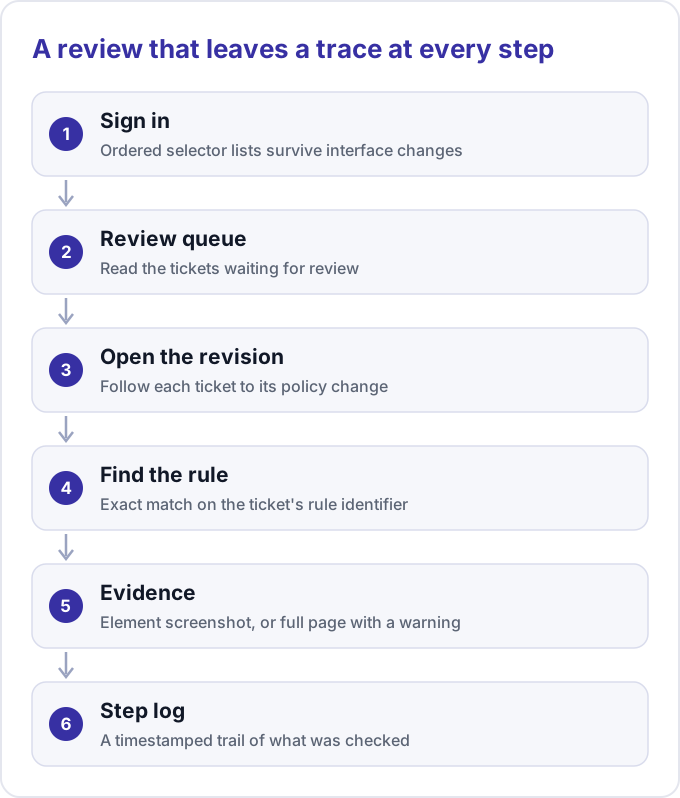
A run starts with one command. Settings come from environment variables or a local environment file, and flags override them. A --config option prints the effective settings, showing the password only as set or not set.
- Start a Chromium-based browser, optionally headless. If its driver fails, fall back to the other supported browser.
- Sign in, locating the username, password and submit controls through ordered selector lists.
- Open the review module and read the first two tickets in the queue.
- For each ticket, extract the rule identifier and revision link, open the revision in a new tab and click the control that shows changes.
- Find the row whose rule matches the ticket exactly, scroll to it and save an element screenshot named with the ticket position, the rule identifier and a timestamp. With no match, save a full-page screenshot.
- Close the tab, return to the queue, and list every file captured.
Every step writes a timestamped line to the console and a log file. A companion script reads a revision’s change-log text and lists which members were added and removed, so a reviewer reads the difference, not two long lists.
Results
- One command produces a consistent screenshot of the changed rule for each ticket, plus a log of how it got there.
- A maintenance pass in 2026 made the project installable again on a clean Python 3.11 environment. A scripted check of installation, module imports, the command-line help and dependency consistency passed 10 of 10 items.
- I have not measured time saved, so this page claims no figure. The repository has no automated tests, and the 2026 pass had no live platform, so it verified installation and imports, not the browser flow.
Lessons
- Silent configuration failures are the worst kind. The environment file loaded after the module that reads it, so settings were ignored without an error. Loading it first fixed that, and
--configshows the effective settings. - Remove dead dependencies. An unused package pinned an old Selenium major version and made the requirements impossible to install.
- With no tests, keep a smoke check: install into a fresh environment, import every module, run the help.
- Ordered selectors absorb interface changes but can also hide them, so log which path ran and keep the fallback screenshot.
- The screenshots contain internal policy detail. Store them with the same care as the policy itself.